

The AmeriCorps Member Hours Report is where you can see the progress of your program participants who are AmeriCorps Members.
This report can be accessed at the bottom of the on the Reports page. Once on the Reports page, click Member Hours located below the Americorps heading.
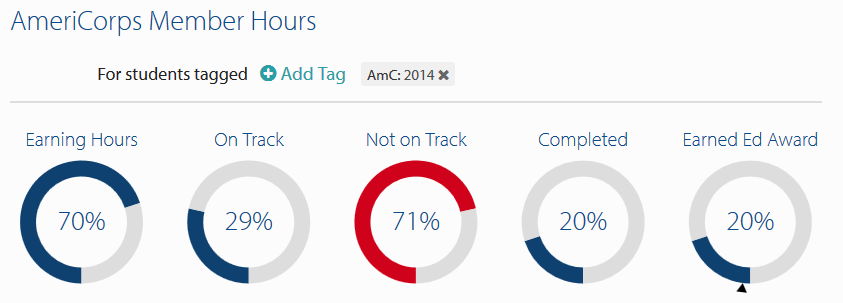
The functionality of this report is similar to other Reports. On the top of the page you can filter who is included in the report by utilizing tags, and below the filters you can see summaries of key information in the report dials. By default, the report looks at AmeriCorps members in the current grant year tag. For example, the report below is using the AmC: 2014 grant year tag.
Below the dials are a list of your program participants who have AmeriCorps Slots. There are categories for: Student Name, Slot Type, Start Date, Remaining Hours and Slot Status.
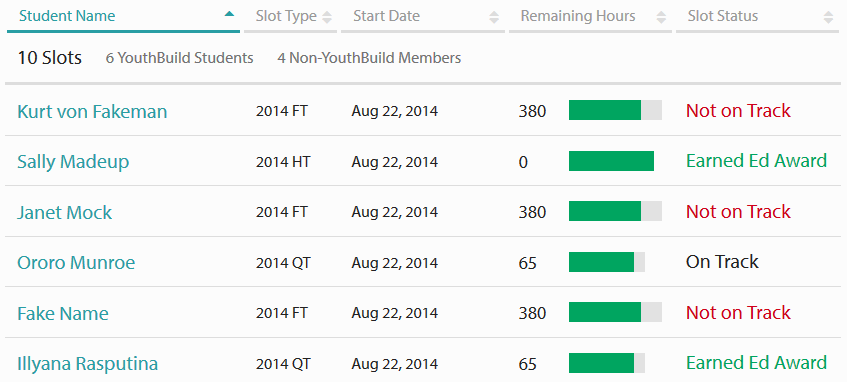
Clicking on a student will redirect you to that student's AmeriCorps Slot and Hours page where you can enter or edit information.
For more information on how parts of this report are calculated, see the How is an AmeriCorps Slot Calculated to be on Track? article.
Information on what Non-YouthBuild AmeriCorps Members are and how to enter them can be found in the Adding Other Participants / Non-YB AmeriCorps Members article.
Article Keywords / Topics: AmC