

We are excited to announce that some needed changes and additions have been made to the education page in DYB! Rest assured that previously entered data will remain intact, but users will now have much more flexibility in the types of educational achievements they may enter. These changes should be viewable starting October 1, 2026.
Please read the descriptions of the additions and changes below.
Last Grade Attended Before Enrolling
A new question has been added to the education profile section: What was the last grade this student attended before enrolling? Users must enter the last grade the student attended in school before enrolling in YouthBuild.

EFL and Grade Level Educational Tests
Users can add Educational Tests that use EFL or grade level benchmarks. Click Add Test to add a pre-test or a post test.
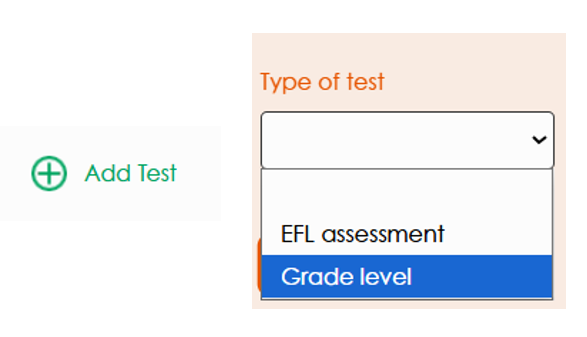
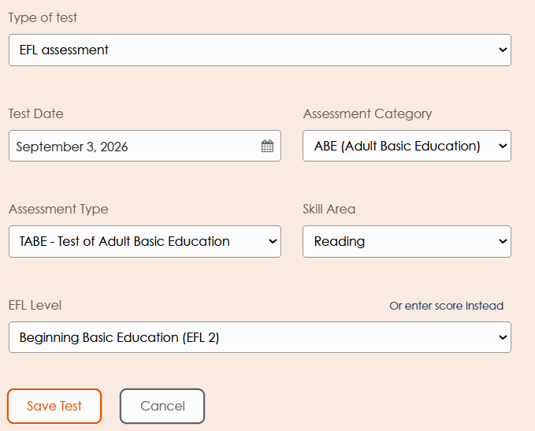
When selecting EFL, users can enter the EFL or the raw score. DYB will automatically calculate the EFL. See the form below for a better understanding of what data will be needed to enter an EFL assessment.
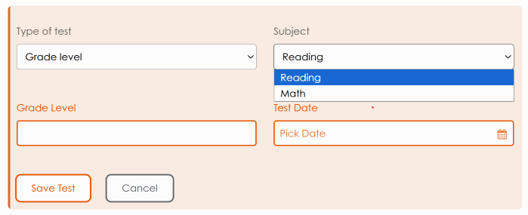
When selecting grade level users will be asked for a grade level and subject. DYB will automatically calculate grade level gains.
GED and HiSET Subject Tests
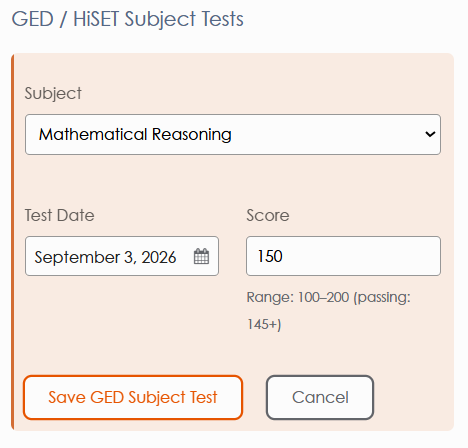
Users can now enter passed subject tests towards the attainment of a GED or HiSET. Please note that that this form does not record the full attainment of the GED/HiSET, but rather any passed subject test. See the form below for a better understanding of what data will be needed to enter subject tests.
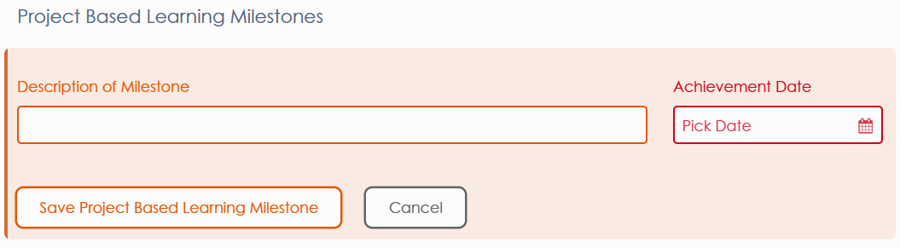
Project Based Learning Milestones
Users can now enter project based learning milestones. If your student passes a project based learning milestone you may record it here. See the form below for a better understanding of what data will be needed to enter subject tests.
Reach out to DYB support with any questions.